How much does an hour of website downtime cost your business?

Jesse Jesse
7 September 2026 6 min read

How much does an hour of website downtime cost your business?

An hour of website downtime is rarely just an hour of missed revenue. We see it regularly with newly onboarded clients: one server hiccup, a failed plugin update, and the site goes down at precisely the moment a campaign is running. The bill is then spread across places you don't immediately see.

Below is what it actually costs, where it usually comes from, and what you should do if your site is currently unreachable.

In short:

  • Calculate it for your own situation: average turnover per hour multiplied by the duration of the outage. That figure makes the discussion about hosting a lot shorter.
  • A slow or half-broken site costs you the same as a site that is completely down, but your monitoring often doesn't notice it.
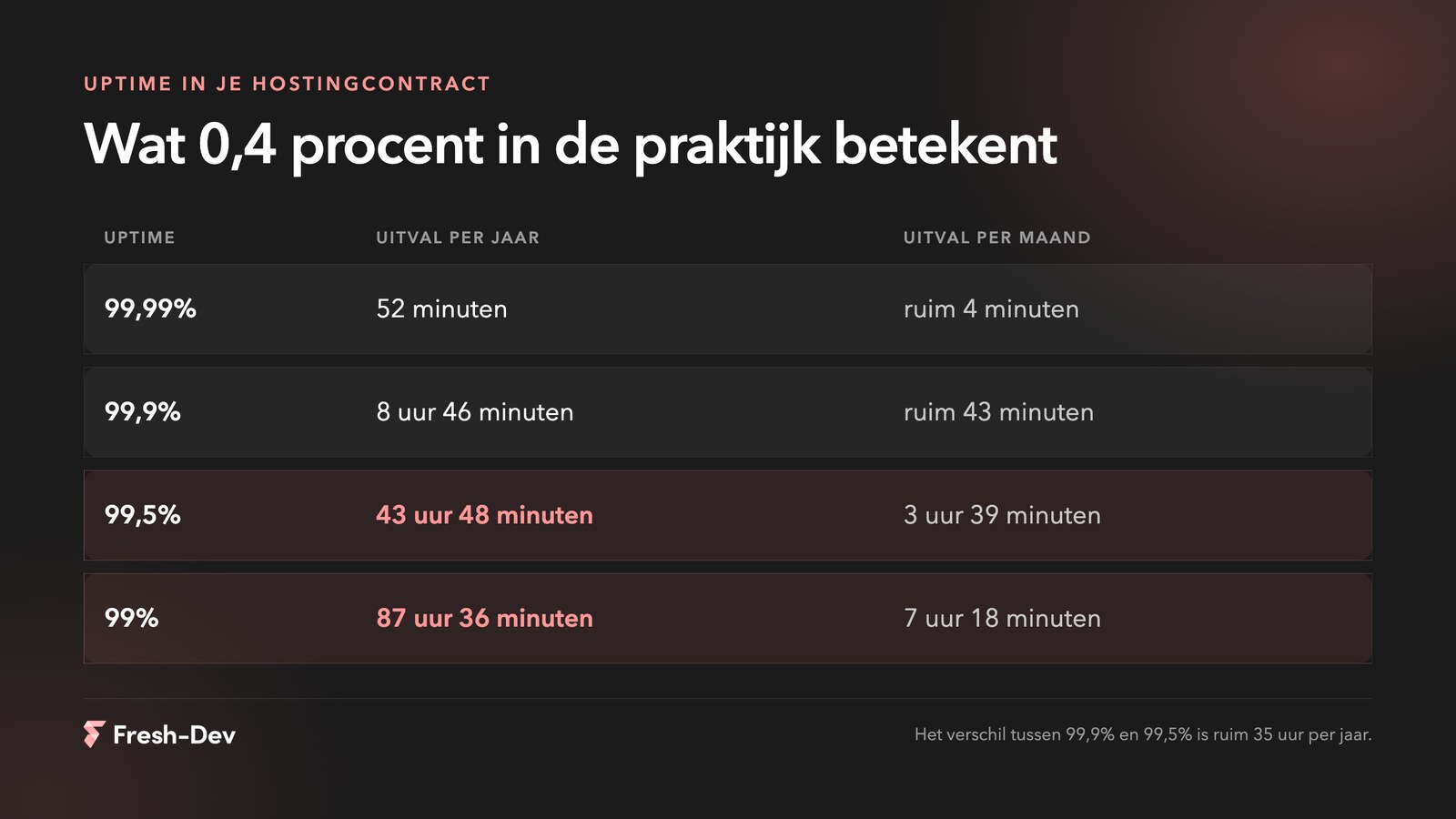
  • The difference between 99.9% and 99.5% uptime in your contract is over 35 hours a year.
  • Enable uptime monitoring from multiple locations, so you know before your customer does.
  • Test major updates on a staging environment. That saves most self-inflicted downtime.

In this article:

Table of downtime per year and per month for 99.99 to 99 percent uptime

Flat is not the only problem

Downtime doesn't have to mean your site is offline. A page that takes eight seconds to load, a form that hangs, a checkout that breaks halfway through: to your visitor, that feels the same as an error message. Roughly speaking, there are two types:

  • Hard downtime. Server is down, DNS is failing, 5xx errors. Nobody can get in, and your monitoring is going off.
  • Soft downtime. The site is still technically up, but it's so slow or so broken that it's unusable. Often more damaging, precisely because the monitoring doesn't see it.

That second category is the most frustrating. Your uptime report shows 100%, whilst your customers haven’t been able to check out for two days. You can find out where this comes from and what you can do about it in our blog post on why your website loads slowly.

What did it cost you right away

The easiest item to calculate is lost revenue: average revenue per hour multiplied by the duration of the outage. On top of that, your paid marketing simply keeps running. Advertising on a page that isn't working is pure wasted money, and that visitor will rarely return afterwards.

An example calculation for a fictional webshop that goes down for thirty minutes during a campaign:

Calculation example of the cost of 30 minutes of website downtime during a campaign

And what is not on an invoice

This is usually where the greatest damage lies, and that is the hardest to prove.

A visitor who is turned away by your site at a crucial moment clicks back once and then goes to a competitor. On the web, switching costs practically nothing. Furthermore, during a product launch or a press moment, a flat site is a lasting first impression: people don't remember that it was down for twenty minutes, they remember that it broke precisely when they viewed it for the first time.

And then there's your searchability. Search engines constantly crawl your site. If they hit a 500 or a timeout a few times, they'll come back less often, and if problems persist, your ranking drops. Recovery then takes weeks. Four hours of downtime at the wrong moment can cost months of SEO work.
How stable is your site?

Drop your website, and we'll check where the weak spots are: your hosting, your backups and whether anyone notices if something goes down. You'll hear from us about what we find, even if everything is completely fine.

Where server downtime usually comes from

The recurring culprits we encounter, in order of how often we see them:

  • An update that has not been tested. Plugin or theme updated on the live site, something clashes, done. By far the most common cause, and the only one you have completely under your own control.
  • Hosting that no longer fits. A package that was fine for the traffic back then. At the first spike from a campaign or a press release, it falls over.
  • The neighbours on your server. With cheap shared hosting you share your machine with hundreds of others. If one hogs all the capacity, you go down too.
  • Abuse and attacks. A poorly secured form that is being drained, or a site that has been taken over and is sending spam until the server gives out. How to prevent that is in our blog about Secure WordPress.
  • Forgotten certificates and domains. An SSL certificate that expires makes your site completely inaccessible to everyone in an instant, even though the server is working fine.

A slow site and a down site feel the same to your visitor. If it doesn't work, they click away.

– Jesse Lafeber, Fresh-Dev

Your site is currently unreachable, what do you do?

If you end up here while things are going wrong at the moment, follow this sequence. That way, you'll know where the issue is within a few minutes.

  • Is it really down, or just for you? Check it from your mobile on 4G, or via a service that requests your site from multiple locations. Sometimes it's your own internet or your own IP that is blocked.
  • Look at the error message. A 500 points to your site or your code, a timeout to your server, and “server not found” to your DNS or your domain.
  • What was changed last? Nine times out of ten, something was recently updated or modified. Rolling it back is quicker than figuring it out.
  • Check your domain and certificate. Expired is expired, and that can be sorted within an hour.
  • Call your hosting provider. He sees in the logs what you cannot see. Ask explicitly if something is going on on the server side.

In the meantime, put up a temporary page with a phone number or email address. That's better than an error message, because then someone who needs you can still reach you.

What you arrange in advance

Most of it is preventable, and it is not a major project:

  • Uptime monitoring from multiple locations, with an alert on your phone. You want to know before your customer does.
  • A staging environment through which every major update is first routed.
  • Back-ups that you have actually restored once, so you know they work.
  • Caching and a CDN, so a slow server doesn't immediately drag down your entire site.
  • A hosting package that matches your traffic of today, not that of four years ago.
  • For a big campaign: test under load for an hour. That saves you a day of recovery.

With us, this is in the maintenance, because fixing things afterwards is always more expensive than setting them up properly from the start. Curious about how stable your site is right now? Send us your website or schedule a consultation.

Related Blogs