How much does an hour of website downtime cost your business?
Website downtime costs more than lost revenue. Seven hidden costs and how to prevent them before they add up.
Read on Jesse
JesseBijna elk bedrijf heeft een contactformulier en bijna niemand weet of het een goed formulier is. Het staat er sinds de oplevering, er komen aanvragen binnen, en zolang dat zo blijft kijkt niemand er meer naar.
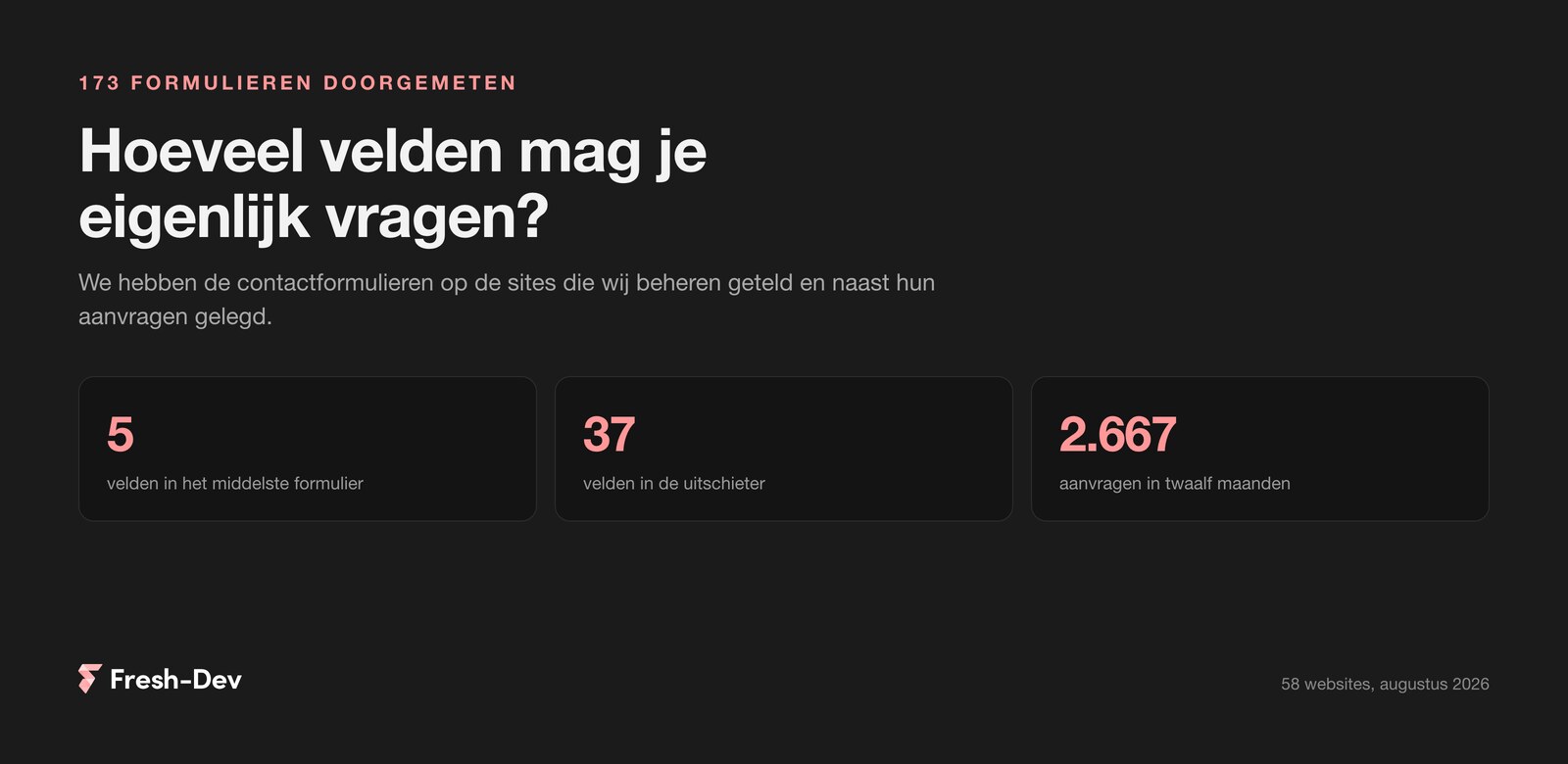
Wij konden die vraag een keer echt beantwoorden, want we beheren een paar honderd websites. Dus hebben we ze doorgemeten: 173 formulieren op 58 sites, met daarnaast het aantal aanvragen dat er in twaalf maanden doorheen is gekomen. Samen goed voor 2.667 ingevulde formulieren.
Wat eruit kwam:
In this article:
De opzet, zodat je weet wat de cijfers waard zijn.
Het voorbehoud is belangrijk. Deze sites trekken niet evenveel bezoekers. Een formulier met weinig aanvragen kan een lang formulier zijn, of gewoon op een rustige pagina staan. Dit is dus geen laboratoriumproef en we doen ook niet alsof. Wat het wel is: 173 formulieren uit de praktijk, waarin dezelfde patronen terugkomen die je ook in groter onderzoek ziet.
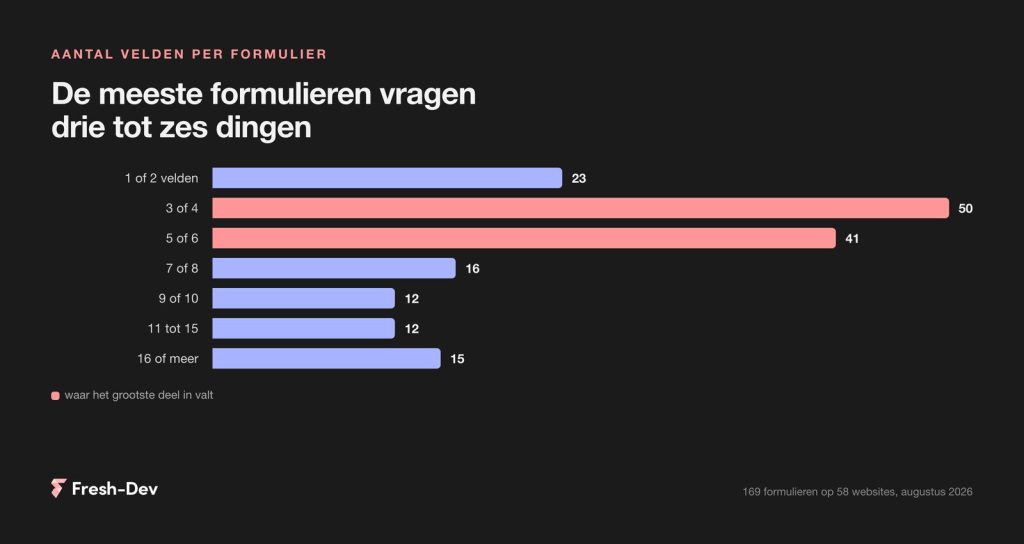
Verdeeld naar het aantal velden ziet het er zo uit: verreweg de meeste formulieren vragen drie tot zes dingen. Dat is de standaard geworden, en terecht, want dat is precies genoeg om iemand terug te kunnen bellen met een zinnig antwoord.
Interessanter is de staart. Vijftien formulieren vragen zestien dingen of meer, en de langste komt op zevenendertig velden. Dat zijn bijna altijd offerte- of aanmeldformulieren waarin de hele intake is gepropt: alles wat je normaal in een gesprek zou vragen, maar dan vooraf en zonder dat er iemand meekijkt.
Van de formulieren die het afgelopen jaar aanvragen binnenkregen, vraagt iets meer dan de helft om een telefoonnummer. Verplicht zijn er meestal drie velden. Dat is bij een contactformulier doorgaans naam, e-mailadres en bericht, en dat is een prima ondergrens.
Als je de formulieren op lengte groepeert en per groep kijkt naar het aantal aanvragen, komt het volgende beeld naar boven.
Formulieren met elf velden of meer halen ongeveer een derde van wat de kortste groep haalt. Dat is een fors verschil, ook als je meeweegt dat de sites verschillend bezoek krijgen.
Er zit één uitzondering in die het vermelden waard is, want die maakt het verhaal bruikbaarder. De groep met acht tot tien velden doet het bovengemiddeld goed. Dat zijn boekings-, offerte- en aanmeldformulieren, en daar zit een ander soort bezoeker achter: iemand die al besloten heeft en nu iets geregeld wil hebben. Die vult tien velden zonder morren in.
Daar zit de eigenlijke les. De lengte is niet het probleem, de plek in het proces is dat wel. Iemand die net op je site is en een vraag heeft, wil vier velden. Iemand die een offerte wil, vult er graag tien in als die vragen ergens over gaan. Ga je bij de eerste groep de vragenlijst van de tweede uitserveren, dan haakt de helft af.
De lengte is niet het probleem, de plek in het proces is dat wel. Iemand met een vraag wil vier velden, iemand die een offerte wil vult er graag tien in.
– Jesse Lafeber, Fresh-DevHet duidelijkste losse verschil in de meting zit bij het telefoonnummer. Formulieren die erom vragen, krijgen ongeveer veertig procent minder inzendingen dan formulieren die dat niet doen.
Dat is niet vreemd. Een e-mailadres is vrijblijvend, een telefoonnummer voelt als een afspraak. Bij een verkennende vraag wil lang niet iedereen gebeld worden, zeker niet als er nergens staat wat je ermee van plan bent.
Toch is “haal dat veld weg” te makkelijk. Voor een aannemer of een cateraar is bellen de snelste route naar een opdracht, en een aanvraag zonder nummer kost een dag extra heen en weer mailen. De keuze zit dus niet in wel of niet vragen, maar in hoe.
Zo bouwen wij een formulier op, en dat is wat ons betreft geen kwestie van smaak maar van rekenen.
Het lastige aan formulieren is dat je alleen ziet wat er binnenkomt. Iemand die begint en halverwege stopt, laat niets achter. Daarmee blijft het gissen naar de vraag of je formulier te lang is of je pagina te weinig bezoekers trekt.
Daarom meten we op onze eigen site sinds kort ook het moment waarop iemand in een formulier begint te typen. Het verschil tussen die twee cijfers is de enige die je echt iets vertelt. Beginnen er twintig mensen aan je formulier en versturen er vier, dan ligt het aan het formulier. Beginnen er vier en versturen er vier, dan ligt het aan de pagina ervoor.
Dat is met een tag manager in een middag ingericht en het is voor elke site nuttiger dan de zoveelste dashboardtegel. Zonder dat cijfer optimaliseer je op onderbuik.
Laat je website achter, dan lopen we je contactformulier na op het aantal velden, de verplichte vragen en waar bezoekers waarschijnlijk afhaken. Je krijgt binnen een werkdag een reactie met wat ons opvalt.
Loop je eigen formulier eens langs met de vraag per veld: gebruik ik dit antwoord binnen een dag? Bij de meeste formulieren kunnen er twee tot drie velden uit zonder dat iemand het mist, en dat is meteen de goedkoopste verbetering die je aan je website kunt doen.
Wil je weten hoeveel mensen bij jou beginnen en afhaken, of wil je dat we er samen naar kijken? Daar helpen we graag bij.
Website downtime costs more than lost revenue. Seven hidden costs and how to prevent them before they add up.
Read on
Measuring GEO optimisation without search rankings. Six figures that show whether AI mentions you, what you'd better not measure, and how to set up a baseline measurement.
Read on
Search Console has been showing what Google sends to your Instagram, TikTok, X and YouTube since the end of July. We checked twelve Dutch search queries: where does that actually pay off?
Read on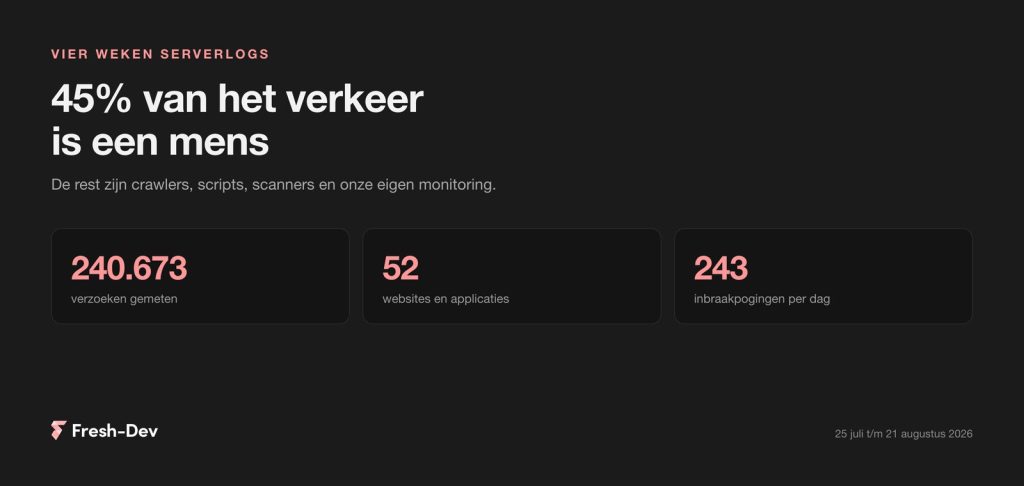
We have combed through four weeks of server logs from 52 sites: 45 per cent human, GPTBot seven times busier than Googlebot and 243 intrusion attempts per day.
Read on
What Claude Skills are, how to create one yourself in ten minutes, and where to place them in Cowork, Claude Code and the API. With an example and common mistakes.
Read on
Elementor Pro 4.2.2 patches a vulnerability in the upload field of the form block. Check in 30 seconds if your site is at risk and what you need to do now.
Read on